 v0.2.0Personal Finance
A private bill & subscription tracker
Browser reminders before bills, renewals & free trials charge you — local-first.
Free · Local-first · No account required
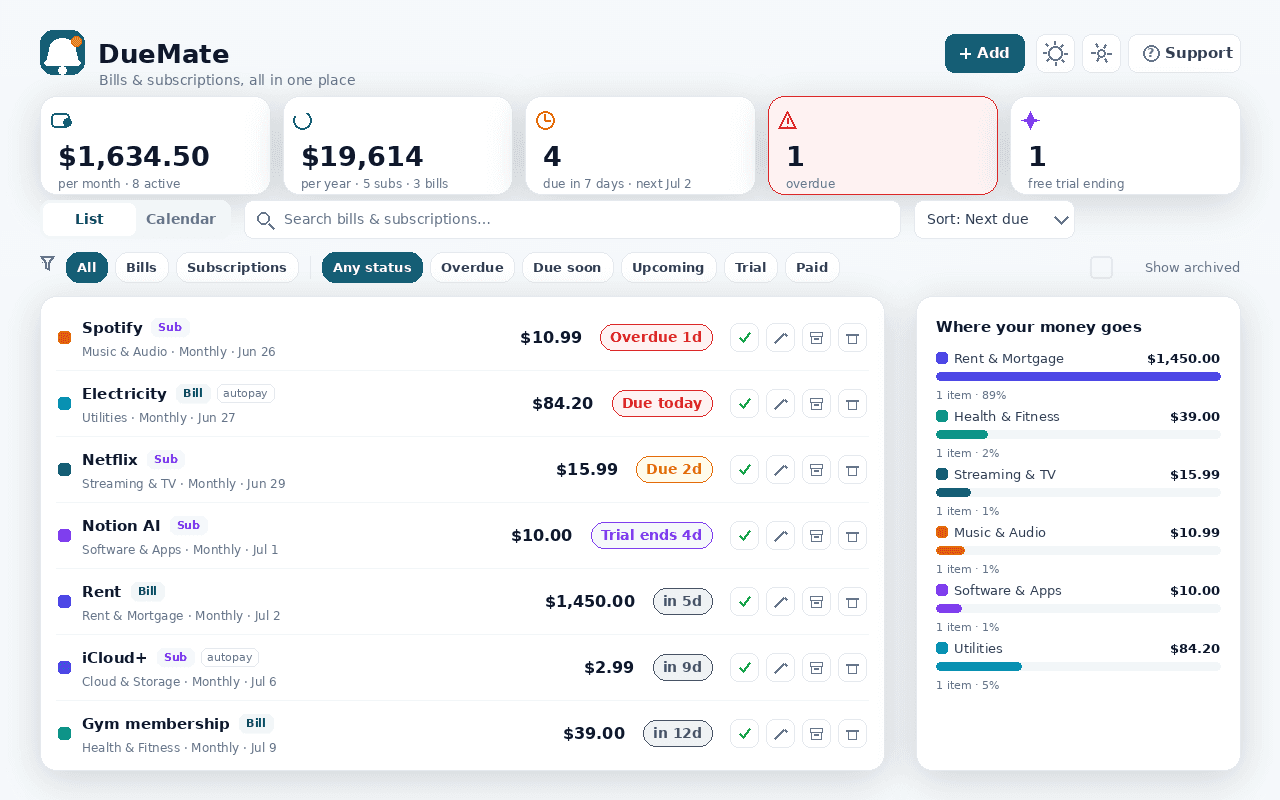
Late fees and forgotten free trials are money you never meant to spend. DueMate keeps every recurring payment — rent, utilities, Netflix, that gym membership — in one place and reminds you, right in the browser, before each one is due. It runs entirely on your device.
Track bills and subscriptions together on any cycle — one-time, weekly, every two weeks, monthly, quarterly, every six months or yearly. Pick a default lead time (say, three days) or override it per item, and DueMate notifies you in time and again on the due day. Mark a subscription as a free trial and it reminds you to cancel before the trial converts to a paid charge.
See everything as a searchable, sortable, filterable list or a month calendar, and know the real cost with an automatic monthly total, a yearly projection and a per-category breakdown of where your money goes. Mark items paid, advance to the next cycle, flag autopay, archive what's done, and back everything up to JSON or export a CSV.
Most "free" subscription trackers ask you to connect your bank or scan your email. DueMate never does — you add items yourself, and by default nothing leaves your browser. New in 0.2: optional Cloud Sync keeps your bills in last-write-wins sync across your devices using only an anonymous install id — it stays off until you switch it on, and you can wipe the cloud copy anytime. No account, no tracking, no bank linking.
Features
Everything DueMate does
Reminders before they're due
Pick a default lead time or set one per item; DueMate alerts you ahead of each due date and again on the day.
Free-trial guard
Mark a subscription as a trial and set when it converts — DueMate reminds you to cancel before it becomes a paid charge.
List and calendar
A searchable, sortable, filterable list of every item, plus a month calendar of everything that's due.
Know the real cost
An automatic monthly total, a yearly projection and a per-category breakdown of where your money goes.
Optional Cloud Sync
Turn on Cloud Sync to keep your bills, subscriptions and categories in last-write-wins sync across devices via an anonymous install id — off by default, with one-tap delete of the cloud copy.
Private by design
No account, no bank linking, no email scanning. Your data stays in your browser unless you opt into Cloud Sync, with light & dark themes and JSON/CSV backup.
Screenshots
See it in action
How it works
Up and running in seconds
- 1
Install DueMate
Add it to Chrome and pin it to your toolbar; press Alt+Shift+D to open it anytime.
- 2
Add your bills and subscriptions
Enter each item's amount, category and billing cycle — or mark it as a free trial with the date it converts.
- 3
Set your reminder lead time
Choose a default (e.g. three days before) and the daily hour DueMate runs its local check; override the lead time per item if you like.
- 4
Stay ahead
Get a browser notification before each due date, watch the toolbar badge for what's overdue or due today, and (optionally) turn on Cloud Sync to mirror everything to your other devices.
Keyboard
Shortcuts
| Action | Windows / Linux | macOS |
|---|---|---|
| Open DueMate (due soon) | Alt+Shift+D | Option+Shift+D |
| Open the DueMate dashboard | Alt+Shift+U | Option+Shift+U |
Privacy
Why each permission is needed
DueMate asks for the minimum and explains every one.
storageSaves your bills, subscriptions, categories and settings locally via chrome.storage on your device.
alarmsSchedules a once-a-day local check so reminders fire on time even when the popup isn't open.
notificationsShows the actual reminder — e.g. "Due in 3 days" or "Free trial ending" — as a browser notification.
host access (factory-chrome-extensions.vercel.app)Only when you enable Cloud Sync: the extension calls the Extension Factory sync API to back up and restore your bills across devices. With Cloud Sync off, no network requests are made.
Read the full privacy policy.
FAQ
Questions, answered
A private bill & subscription tracker
Private bill & subscription reminder: track due dates, get browser alerts before bills, free trials & renewals charge you.