 v0.1.2Productivity · New Tab
Open a new tab and breathe
Clock, focus, to-dos, speed dial, notes & Pomodoro — 100% local.
Free · Local-first · No account required
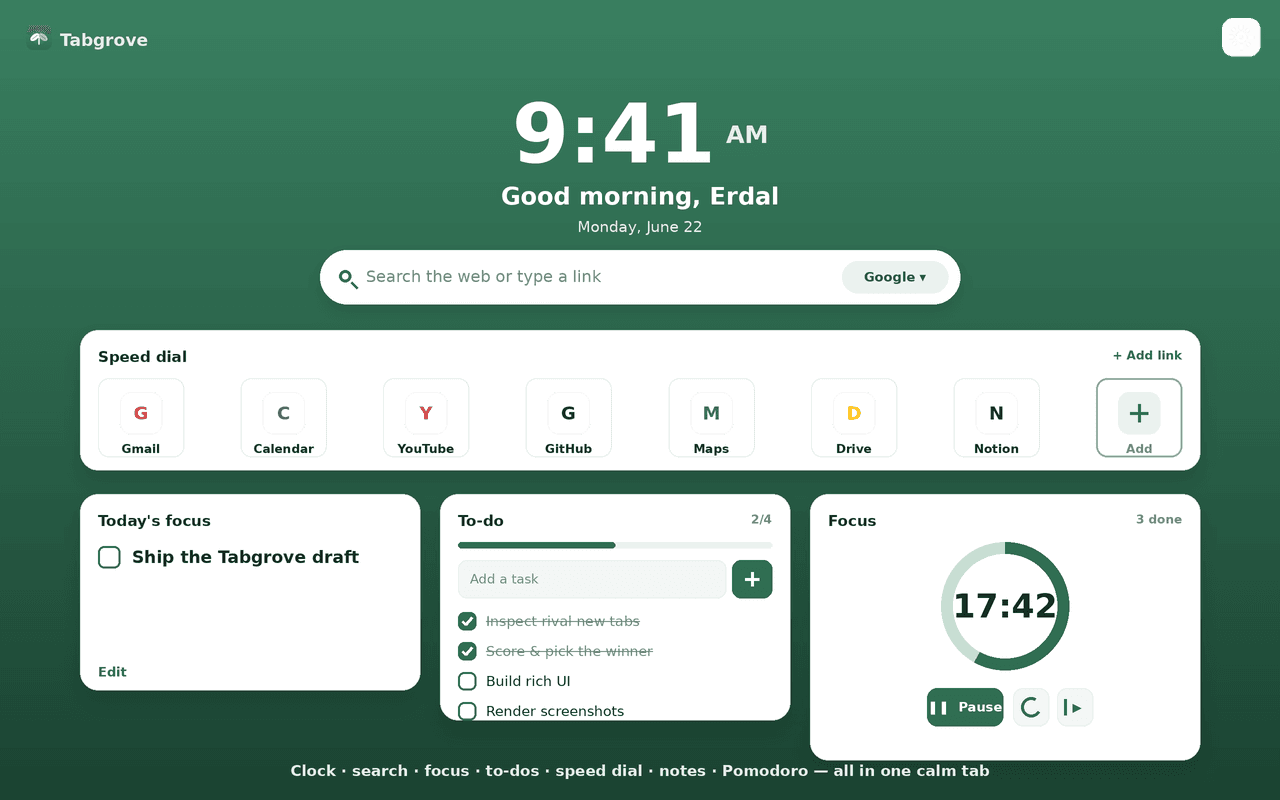
Open a new tab and breathe.
Tabgrove turns every new tab into a calm, all-in-one dashboard — and keeps every byte on your device. A clock and greeting, today's focus, a to-do list with progress, speed-dial tiles with crisp local favicons, your most-visited sites, autosaving notes, a Pomodoro timer and a search bar across six engines.
Make it yours with calm gradients, a solid colour or your own photo, light, dark or auto themes, and any widget turned on or off.
Private by design. Tabgrove makes zero network requests — no account, no sync server, no analytics, no ads. It asks for just three narrow permissions (storage, topSites, favicon) and never the “read your data on all websites” access other new-tab extensions request. Every widget is free and offline, forever.
Features
Everything Tabgrove does
Clock & greeting
A big, clean clock with a time-aware greeting and the date (12 or 24-hour, optional seconds).
Today's focus
Set one intention and check it off.
To-do list
A to-do list with a progress bar, quick add, and one-tap clear-completed.
Speed dial
Your favourite sites as tiles with crisp local favicons; add, name and remove your own.
Most visited
Your top sites, one click away (optional).
Notes
An autosaving scratchpad for a thought, a link, a list.
Pomodoro timer
A focus ring, breaks, and a session counter.
Search bar
Search Google, DuckDuckGo, Bing, Brave, Ecosia or Startpage — or jump straight to a URL.
Customization
Calm gradient backgrounds, a solid colour or your own photo; light, dark or auto; toggle any widget.
Screenshots
See it in action
How it works
Up and running in seconds
- 1
Install Tabgrove
Add it from the Chrome Web Store; it becomes your New Tab page.
- 2
Open a new tab
Your dashboard loads instantly — clock, focus, to-dos, speed dial and notes, all offline.
- 3
Set up your day
Write today's focus, add to-dos and your favourite sites, and start a Pomodoro round.
- 4
Make it yours
Pick a background and theme, choose your search engine, and toggle any widget on or off.
Privacy
Why each permission is needed
Tabgrove asks for the minimum and explains every one.
storageSaves your dashboard — to-dos, notes, speed-dial links, daily focus and all settings (theme, background, widget toggles) — locally via chrome.storage.local. Nothing is transmitted.
topSitesReads the browser's most-visited sites (read-only) to render the optional “Most visited” tiles. The list is shown only; it is never stored or sent anywhere.
faviconRenders site icons for speed-dial and top-site tiles using Chrome's built-in local favicon API. Icons resolve on-device with no network request.
Read the full privacy policy.
Open a new tab and breathe
A calm new tab: clock, focus, to-dos, speed dial, notes, Pomodoro & search. 100% local — no account, no ads, no paywall.