 v0.1.0Lifestyle
A private practice studio in a tab
Metronome, chromatic tuner, drone & practice log — offline.
Free · Local-first · No account required
Tempokit is a complete music practice studio in one private browser tab — a metronome, a chromatic tuner, a reference drone and a practice log — with no ads, no account and no cloud.
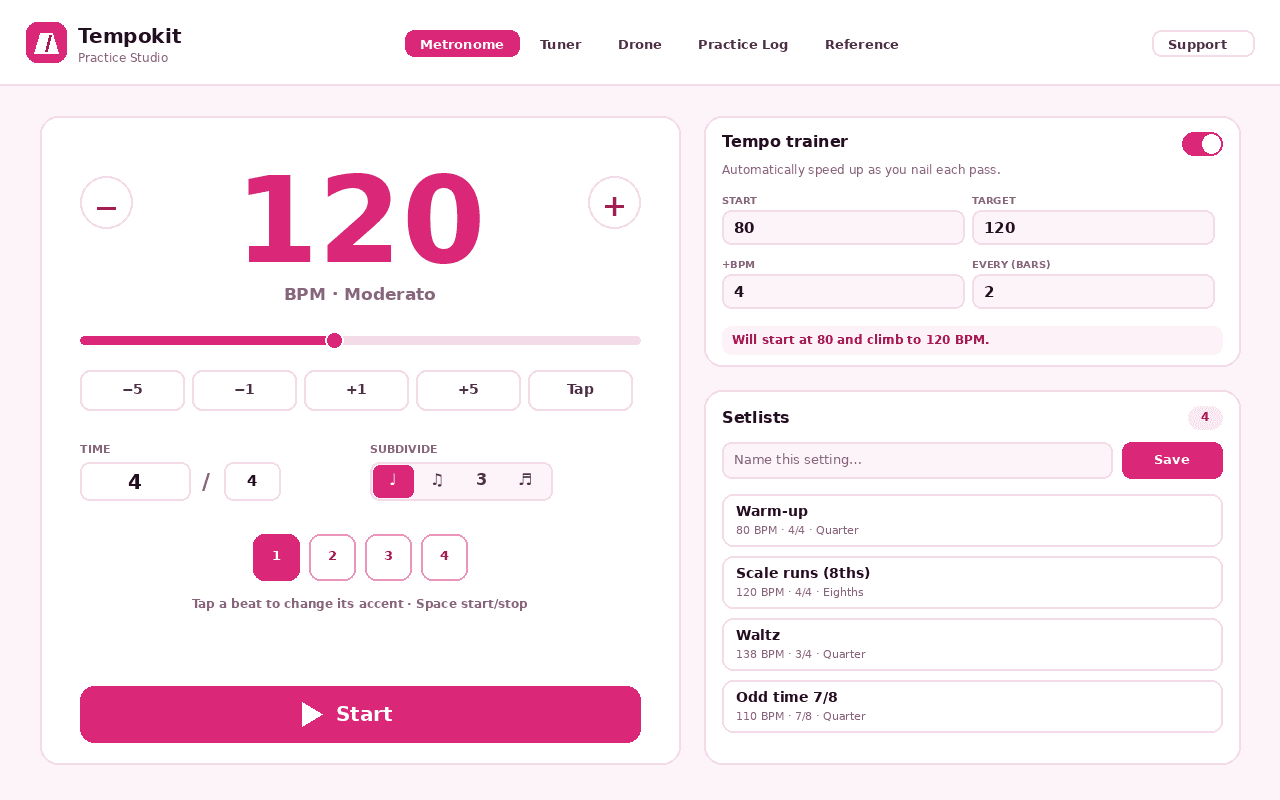
The metronome runs on a Web-Audio scheduler for rock-steady timing, with tap tempo and a 30–300 BPM slider, any time signature (4/4, 3/4, 5/4, 6/8, 7/8, 9/8, 12/8 and custom), subdivisions, click-to-set per-beat accents and a count-in. An auto tempo trainer speeds you up as you nail each pass, you can save one-tap setlists for your songs and exercises, and it docks in the side panel so it keeps time while you watch a lesson in the main tab.
The chromatic tuner listens through your microphone and shows the note, cents and frequency, with one-tap reference tunings for guitar, drop D, bass, ukulele, violin and cello and an adjustable concert pitch (A4 415–466 Hz). Audio is analysed on your device in real time — never recorded, stored or sent anywhere. A reference drone sustains any pitch, with an optional fifth or octave, for intonation work.
Time and journal every session with day streaks and a 14-day chart, explore scales and instrument tunings, and back everything up to JSON. Only two permissions — storage and side panel — with no host permissions, no tracking and no ads. It works fully offline; everything lives on your device.
Features
Everything Tempokit does
Rock-solid metronome
A Web-Audio scheduler for steady timing, with tap tempo and a 30–300 BPM slider.
Any meter, any subdivision
4/4, 3/4, 5/4, 6/8, 7/8, 9/8, 12/8 and custom, with eighths/triplets/sixteenths, click-to-set per-beat accents and a count-in.
Tempo trainer & setlists
An auto trainer speeds you up as you nail each pass; save one-tap setlists and dock it in the side panel to keep time while you watch a lesson.
Chromatic tuner
A microphone tuner showing note, cents and frequency, with reference tunings for guitar, drop D, bass, ukulele, violin and cello and an adjustable concert pitch (A4 415–466 Hz).
Reference drone & scales
Sustain any pitch, with an optional fifth or octave, for intonation work — plus a scale explorer and instrument tuning reference.
Practice log & streaks
A session timer and practice journal with day streaks, a 14-day chart, and JSON export/import.
Screenshots
See it in action
How it works
Up and running in seconds
- 1
Install Tempokit
Add it from the Chrome Web Store and pin it to your toolbar.
- 2
Open the metronome
Click the toolbar icon (or press Alt+Shift+M) to dock the metronome in the side panel; set the tempo by tap or slider and pick your time signature.
- 3
Tune and drone
Open the Studio tab and start the tuner (allow the microphone) to see note, cents and frequency, or hold a reference drone for intonation work.
- 4
Track your practice
Time and journal each session, watch your day streak and 14-day chart, and back everything up to JSON.
Keyboard
Shortcuts
| Action | Windows / Linux | macOS |
|---|---|---|
| Open the Tempokit metronome | Alt+Shift+M | Option+Shift+M |
Privacy
Why each permission is needed
Tempokit asks for the minimum and explains every one.
storageSaves your settings, setlists and practice log via chrome.storage on your device. Nothing is sent anywhere.
sidePanelShows the quick metronome in Chrome's side panel so it keeps time while you watch a lesson in the main tab.
Microphone (requested at runtime)Requested by the standard browser prompt only when you start the tuner. Audio is analysed on your device in real time to detect pitch — never recorded, stored or transmitted. Everything else works without it.
Read the full privacy policy.
FAQ
Questions, answered
A private practice studio in a tab
All-in-one metronome, chromatic tuner, drone & practice log. Tap tempo, setlists, tempo trainer. Private, offline, no ads.