 v0.1.0Music Reference
An offline chord, scale & fretboard studio
Find any chord, explore scales, build progressions & keep a songbook — for guitar, ukulele & bass.
Free · Local-first · No account required
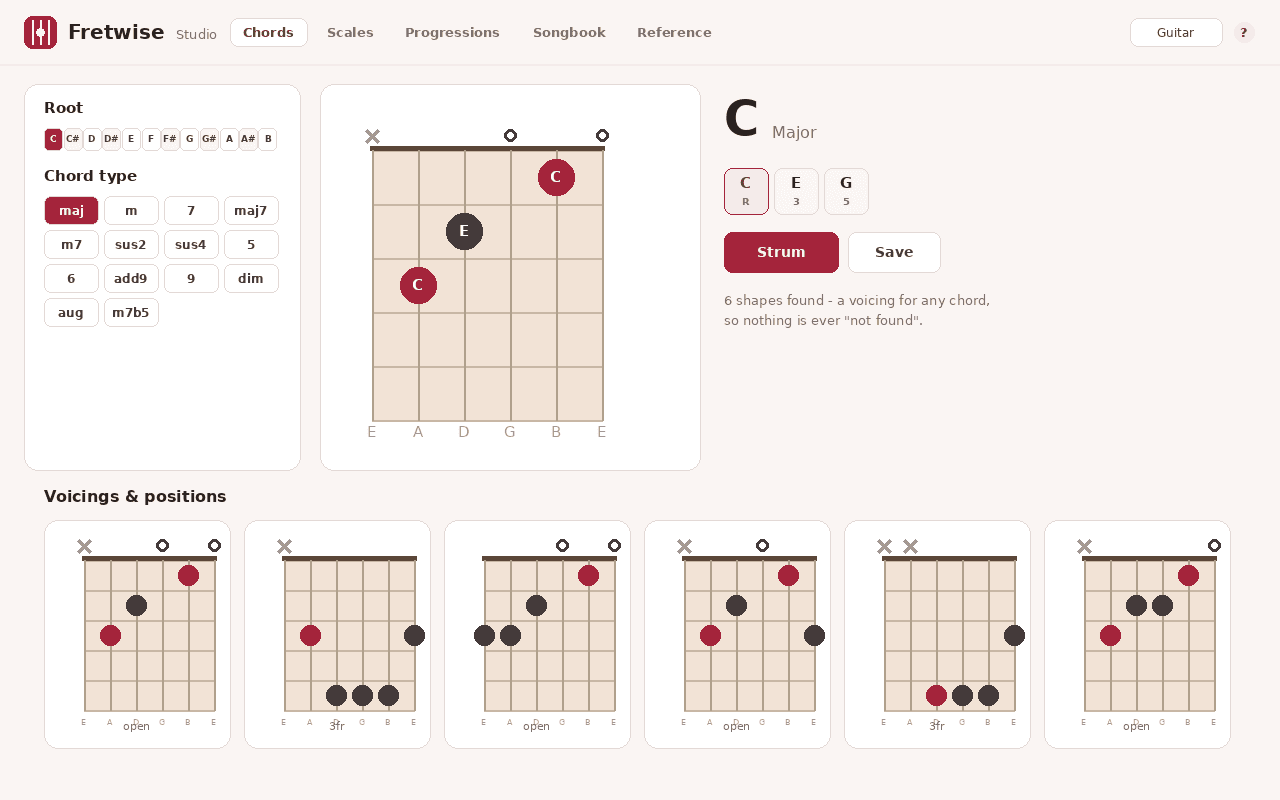
The chord and scale sites players actually use are buried in ads, demand a subscription, only work online, and still say 'chord not found.' Fretwise puts a complete, offline fretboard studio in your browser — chords, scales, progressions and a songbook — and it generates a playable shape for any chord, so nothing is ever missing.
Pick a root and type — or just type a name like 'F#m7' — to get clear, readable diagrams with note names and several playable voicings up the neck, for guitar, ukulele or bass in any tuning. Switch to the scale and fretboard explorer to see any scale or mode across the whole neck with scale degrees, root highlighting and movable position boxes, plus the diatonic chords that belong to the key.
Build progressions by tapping the diatonic chords or loading a preset — I–V–vi–IV, ii–V–I, 50s doo-wop, 12-bar blues — then hear them played back through a built-in, on-device synth and save them. Your songbook keeps chords, scales, progressions and free-text chord/lyric sheets that you can search, favorite and back up to a file, alongside an interactive circle of fifths, chord and scale formula tables, and a tunings chart.
Everything is generated on your device, so it's instant, works with no connection, and shows large, legible diagrams with the actual note names — not a cramped image that crops off your fingers. Switch between guitar, ukulele and bass, alternate tunings, left-handed mode, sharps or flats, and light or dark. No ads, no account, no subscription, and nothing leaves your browser.
Features
Everything Fretwise does
Chord finder
Pick a root and type — or just type a name like 'F#m7' — for clear diagrams with note names and several playable voicings up the neck.
Scale & fretboard explorer
See any scale or mode across the whole neck with scale degrees, root highlighting and movable position boxes, plus the key's diatonic chords.
Progression builder
Tap the diatonic chords or load a preset (I–V–vi–IV, ii–V–I, 50s doo-wop, 12-bar blues…), hear it played back, and save it.
Songbook
Keep chords, scales, progressions and free-text chord/lyric sheets; search, favorite, and back up to a file.
On-device audio
Hear any chord, scale or progression through a lightweight built-in synth — no samples are downloaded and it works fully offline.
Any chord, any setup
Voicings are built from music theory on the fly, so even unusual chords return real shapes — across guitar, ukulele, bass, alternate tunings and left-handed mode. Never a blank 'not found'.
Screenshots
See it in action
How it works
Up and running in seconds
- 1
Install Fretwise
Add it from the Chrome Web Store and pin it to your toolbar — open the popup and you can find a chord straight away.
- 2
Find chords & explore scales
Pick a root and type, or type a name like 'F#m7', to read clear diagrams with note names; switch to scales to see them across the whole neck with the key's diatonic chords.
- 3
Build & hear progressions
Tap the diatonic chords or load a preset, play it back through the on-device synth, and save it to your songbook.
- 4
Save & back up
Keep chords, scales, progressions and chord/lyric sheets in your songbook, then export it to a JSON file to back up or move to another computer.
Keyboard
Shortcuts
| Action | Windows / Linux | macOS |
|---|---|---|
| Open the Fretwise chord finder | Alt+Shift+F | Option+Shift+F |
| Open the full Fretwise Studio | Alt+Shift+G | Option+Shift+G |
Privacy
Why each permission is needed
Fretwise asks for the minimum and explains every one.
storageSaves your songbook (chords, scales, progressions and chord/lyric sheets) and your settings via chrome.storage on your device. Nothing is sent anywhere.
unlimitedStorageLets your songbook grow beyond Chrome's default storage cap, so you can keep a large library of saved chords, scales, progressions and chord sheets locally.
sidePanelOpens Fretwise in Chrome's side panel as a practice companion, so you can keep a chord, scale or progression visible alongside whatever you're reading or watching.
commandsEnables the optional keyboard shortcuts that open the chord finder or the full Studio. You can change or remove them on Chrome's keyboard-shortcuts page at any time.
host access (factory-chrome-extensions.vercel.app)Used only to fetch a small display-config (which Support / Go Pro buttons to show) from the Extension Factory site. The request is anonymous — it sends no personal data and none of your songbook — is cached locally for about 12 hours, and Fretwise works fully offline with a built-in fallback.
Read the full privacy policy.
FAQ
Questions, answered
An offline chord, scale & fretboard studio
Offline chord, scale & fretboard studio for guitar, ukulele & bass: a chord finder that never says 'not found', a scale & neck explorer, progression builder, songbook and on-device audio — no ads, no account.