 v0.1.0Well-being
Guided desk-wellness breaks
Eyes (20-20-20), stretch, hydrate, posture & breathe — private.
Free · Local-first · No account required
Most break reminders just flash a timer and leave you wondering what to actually do.
RestEase is different: every break is a guided exercise that shows you exactly how to rest your eyes, loosen up and reset.
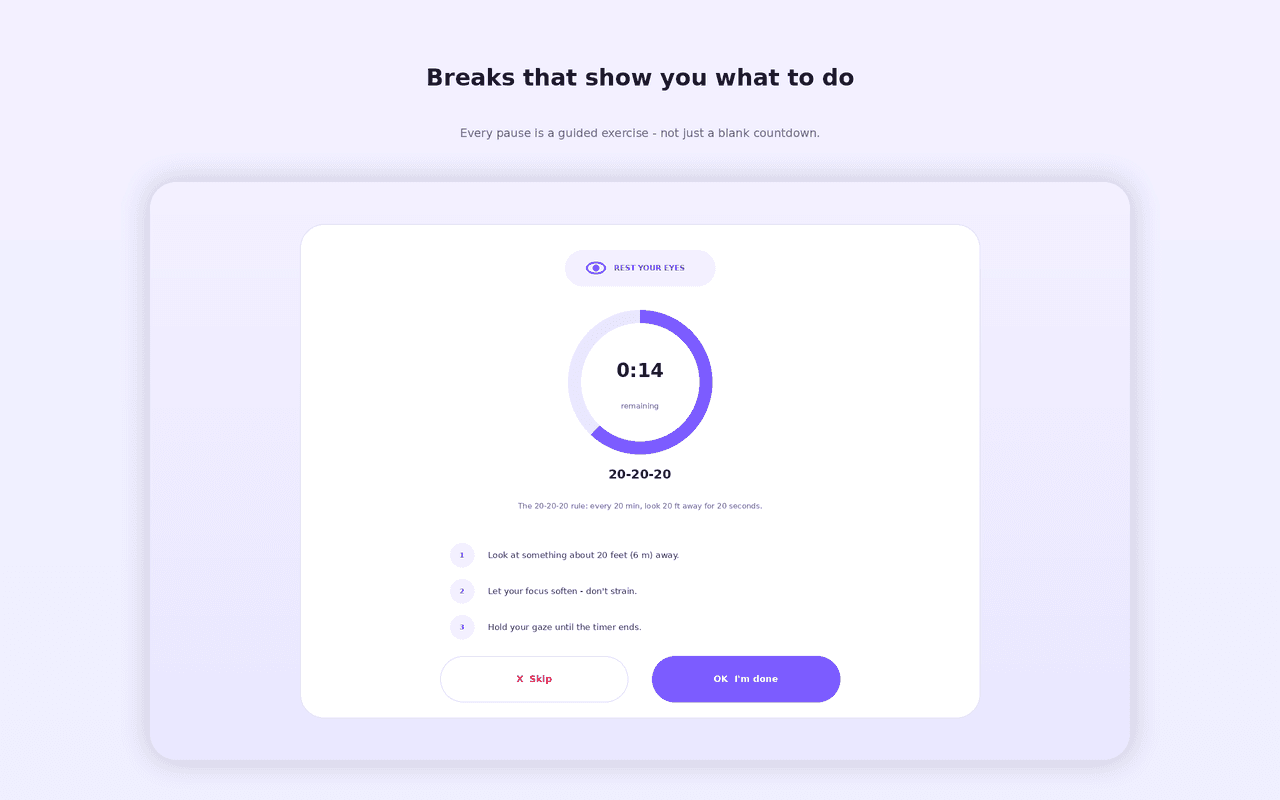
Rest with the optometrist-backed 20-20-20 rule, rotating stretches, hydration nudges, posture resets, stand-and-move and calming box-breathing — on a full-screen coach with a countdown ring.
And it's smart enough to stay quiet: a work-hours window, auto-pause when you're idle, a one-tap focus mode for meetings, snooze and strict mode. 100% private and offline — no account, no network, no tracking.
Features
Everything RestEase does
Rest your eyes
The optometrist-backed 20-20-20 rule: every 20 minutes, look 20 ft away for 20 seconds.
Stretch & posture
Rotating neck, shoulder and wrist stretches, plus quick “sit tall” posture resets.
Hydrate
Gentle water nudges with a glasses-per-day counter.
Stand & breathe
Short stand-and-move breaks and a calming box-breathing animation.
Guided break screen
A full-screen coach with a countdown ring and step-by-step instructions.
Smart scheduling
A work-hours window, auto-pause when idle, focus mode for meetings, snooze and strict mode.
Dashboard & presets
A side-panel dashboard with streaks and a 7-day chart, plus ready-made presets.
Screenshots
See it in action
How it works
Up and running in seconds
- 1
Install RestEase
Add it from the Chrome Web Store and pin it to your toolbar.
- 2
Pick a preset
Start from 20-20-20 Focus, Full Wellness, Pomodoro + Stretch or Hydration — or build your own.
- 3
Take guided breaks
When a break is due, a full-screen coach walks you through the exercise (or press Alt+Shift+B anytime).
- 4
Stay in flow
Set your work hours, let it auto-pause when you step away, and flip on focus mode for meetings.
Keyboard
Shortcuts
| Action | Windows / Linux | macOS |
|---|---|---|
| Open RestEase | Alt+Shift+R | Option+Shift+R |
| Take a break now | Alt+Shift+B | Option+Shift+B |
Privacy
Why each permission is needed
RestEase asks for the minimum and explains every one.
storageSaves your reminder settings and local break/streak statistics on your device.
alarmsSchedules the periodic break reminders reliably while the browser is open.
notificationsShows a break reminder as a system notification.
idleDetects when you step away so reminders auto-pause instead of nagging an empty chair.
sidePanelProvides the live dashboard (next break, stats, streak) in Chrome's side panel.
Read the full privacy policy.
Guided desk-wellness breaks
Guided desk-wellness breaks: rest your eyes (20-20-20), stretch, hydrate, fix posture, stand & breathe. Smart, private, offline.